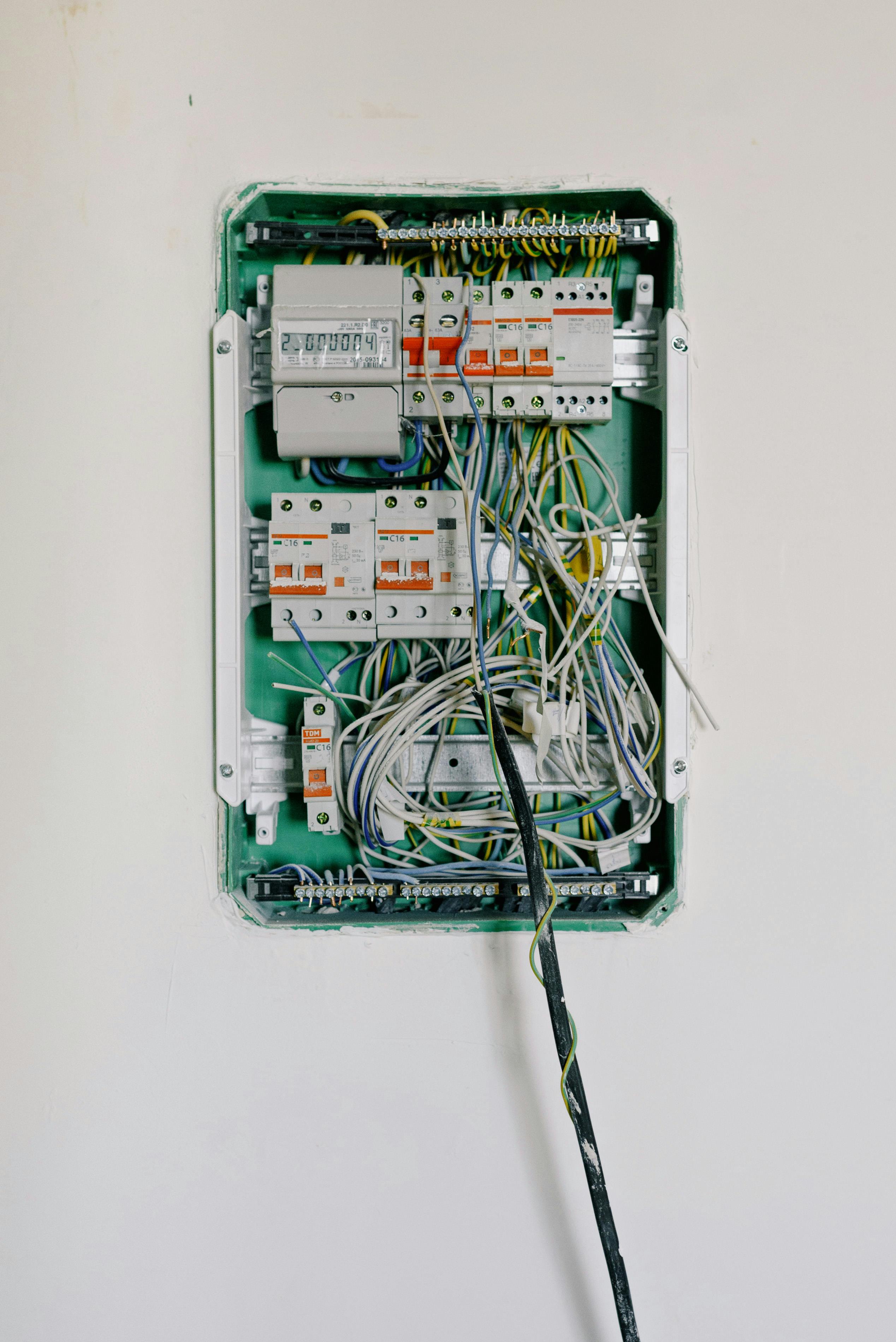

Homeowners can safely handle basic electrical tasks like replacing outlets, switches, and light fixtures. Always turn off power at the breaker and verify with a voltage tester before starting any electrical work.
Understanding your home’s electrical system empowers you to handle basic tasks safely and know when to call a professional. This guide covers electrical fundamentals, safe DIY tasks, and critical safety information.
Electrical Safety: Non-Negotiable Rules
Before any electrical work:
- Turn off power at the breaker - Not just the switch
- Verify power is off - Use a non-contact voltage tester
- Test on a known live circuit first - Confirm your tester works
- Lock out the panel - Prevent others from turning power on
- When in doubt, call an electrician
Electricity can kill. It only takes 100 milliamps to cause fatal heart fibrillation. Always treat every wire as live until you’ve personally verified it’s not.
Understanding Your Electrical System
The Service Entrance
Power flows from the utility to your home through:
- Service drop (overhead) or service lateral (underground)
- Electric meter - Measures consumption
- Main disconnect - Master shut-off (may be inside or outside)
- Main electrical panel - Distributes power to circuits
Your Electrical Panel
The panel (breaker box) is the heart of your system:
- Main breaker: Master disconnect, shows total amperage (100, 150, 200 amps typical)
- Branch circuit breakers: Control individual circuits (15, 20, 30+ amps)
- Bus bars: Metal strips that distribute power
- Neutral bus: Where white wires connect
- Ground bus: Where bare/green wires connect
Circuit Breaker Basics
Standard breakers: Single pole (15-20 amp) for regular outlets and lights
Double-pole breakers: 240V circuits for large appliances (dryers, AC, ranges)
GFCI breakers: Protect entire circuits from ground faults
AFCI breakers: Detect arc faults (required in bedrooms in modern code)
Wire Basics
Wire gauge and amperage:
- 14 AWG: 15-amp circuits (lighting)
- 12 AWG: 20-amp circuits (outlets, kitchen)
- 10 AWG: 30-amp circuits (dryers)
- 8 AWG: 40-amp circuits
- 6 AWG: 50-amp circuits (ranges)
Wire colors (standard):
- Black: Hot (carries current)
- Red: Hot (second hot in 240V or travelers in 3-way switches)
- White: Neutral (return path)
- Bare or green: Ground (safety)
Lower gauge numbers mean thicker wire with higher capacity. Using undersized wire is a fire hazard—never replace wire with a smaller gauge.
Essential Electrical Tools
- Non-contact voltage tester - First tool to buy; essential for safety
- Multimeter - Tests voltage, continuity, resistance
- Wire strippers - Match to wire gauge
- Lineman’s pliers - Cutting and twisting wire
- Screwdrivers - Flathead and Phillips, insulated handles
- Needle-nose pliers - Bending wire, working in tight spaces
- Flashlight/headlamp - You’ll be working with the power off
- Electrical tape - For insulating connections
- Wire nuts - Connecting wires (match to wire size/count)
Replacing an Electrical Outlet
One of the most common DIY electrical tasks.
Standard Outlet Replacement
- Turn off the breaker for that circuit
- Verify power is off with voltage tester at the outlet
- Remove cover plate and unscrew outlet from box
- Note wire positions - Take a photo before disconnecting
- Disconnect wires from old outlet
- Connect wires to new outlet:
- Black (hot) to brass screw
- White (neutral) to silver screw
- Bare/green (ground) to green screw
- Push outlet into box, screw in place
- Install cover plate
- Restore power and test
Installing a GFCI Outlet
GFCI outlets are required in kitchens, bathrooms, garages, outdoors, and near water:
- Turn off power, verify it’s off
- Identify LINE vs LOAD wires:
- LINE: Power coming from panel (only these if end of circuit)
- LOAD: Power going to other outlets (if protecting downstream outlets)
- Connect LINE wires to terminals marked “LINE”:
- Black to brass LINE terminal
- White to silver LINE terminal
- Connect LOAD wires (if any) to “LOAD” terminals
- Connect ground to green screw
- Install and test - Press TEST button, outlet should trip; press RESET to restore
A GFCI outlet can protect all outlets downstream on the same circuit. This is why one bathroom GFCI might protect outlets in another room.
Replacing a Light Switch
Single-Pole Switch (Most Common)
Controls a light from one location:
- Turn off power, verify
- Remove cover plate and switch
- Note connections (usually two black wires and ground)
- Connect to new switch:
- Two hot wires to brass terminals (interchangeable)
- Ground to green terminal
- Install and test
Three-Way Switch
Controls a light from two locations (two switches control one light):
- Turn off power, verify
- Identify common terminal (different color, usually black or copper)
- Note which wire connects to common - Critical!
- Label wires before disconnecting
- Connect to new switch:
- Common wire to common terminal
- Two traveler wires to brass terminals
- Ground to green terminal
- Repeat for second switch if replacing both
Dimmer Switch Installation
- Verify dimmer is rated for your bulb type and wattage
- Turn off power, verify
- Remove old switch
- Connect dimmer wires using wire nuts:
- Ground to ground
- Dimmer hot wires to the two switch wires (no polarity)
- Carefully fold wires into box (dimmers are larger)
- Install and test
Note: Some LED bulbs require LED-compatible dimmers.
Replacing a Light Fixture
Ceiling Fixture Replacement
- Turn off power, verify
- Remove old fixture:
- Remove cover/globe
- Remove mounting screws
- Lower fixture, support it
- Disconnect wires
- Install mounting bracket if different from old
- Connect wires:
- Black to black
- White to white
- Ground to ground and box (if metal)
- Mount fixture per instructions
- Install bulbs, cover
- Restore power and test
Ceiling Fan Installation
More involved but doable:
- Verify box is fan-rated (supports 50+ lbs)
- If not, replace box first
- Turn off power, verify
- Assemble fan per instructions (usually partially)
- Install mounting bracket
- Hang fan on bracket hook while wiring
- Connect wires:
- Black to black (fan motor)
- Blue to black or separate switch wire (light kit)
- White to white
- Ground to ground
- Secure fan to bracket
- Attach blades and light kit
- Test all functions
If replacing a light fixture with a ceiling fan, you must verify the electrical box is fan-rated. Standard boxes can’t support the weight and vibration—the fan could fall.
Understanding GFCI and AFCI Protection
GFCI (Ground Fault Circuit Interrupter)
Protects against shock from ground faults:
Required locations:
- Bathrooms
- Kitchens (countertop outlets)
- Garages
- Outdoors
- Basements (unfinished)
- Near pools/hot tubs
- Laundry areas
How it works: Monitors current flow; if current leaks to ground (like through a person), it trips in milliseconds.
Testing: Test monthly by pressing TEST button. Should trip. Press RESET to restore.
AFCI (Arc Fault Circuit Interrupter)
Protects against fires from arc faults:
Required locations (modern code):
- Bedrooms
- Living rooms
- Many other areas in new construction
How it works: Detects dangerous arcing (like damaged wire insulation) and trips before fire starts.
Troubleshooting Common Issues
Dead Outlet
- Check GFCI outlets - A tripped GFCI elsewhere may cut this outlet
- Check breaker - May have tripped but not fully “off”
- Test outlet with voltage tester
- Check connections inside outlet box (with power off)
Flickering Lights
If one fixture flickers:
- Check bulb connection
- Check fixture wiring
- May be failing fixture or bulb
If multiple lights flicker:
- Could indicate loose connection at panel
- May be utility issue
- Call electrician if persistent
Tripping Breaker
Occasional trip: Normal, especially with high-draw items starting
Frequent trips:
- Identify what’s on that circuit
- Reduce load (move items to different circuits)
- Check for damaged cords/plugs
- If continues, call electrician
Breaker won’t reset: May be short circuit or failing breaker—call electrician
Warm Outlets or Switches
Slight warmth on dimmers: Normal (they dissipate heat)
Hot outlets or standard switches: Dangerous—indicates poor connection, overload, or damage. Turn off breaker and call electrician.
Circuit Mapping
Know what’s on each circuit:
- Get a helper with phone or walkie-talkie
- Turn off one breaker at a time
- Have helper check which outlets/lights went off
- Label breaker with locations
- Create circuit map for future reference
Adding a New Outlet from Existing
This is DIY-able but may require permit:
- Turn off power to existing outlet
- Plan route for new wire
- Install new outlet box
- Run cable from existing box to new box
- At existing box: Connect new wires parallel to existing:
- Black to black (pigtail to outlet)
- White to white (pigtail to outlet)
- Ground to ground
- Wire new outlet
- Test
Running wire through finished walls is challenging. Consider surface-mount raceway systems for an easier approach that’s still code-compliant.
Aluminum Wiring Warning
Homes built 1965-1973 may have aluminum branch circuit wiring:
Hazards:
- Aluminum expands/contracts more than copper
- Connections loosen over time
- Oxidation increases resistance
- Fire risk at connections
Signs:
- Warm cover plates
- Flickering lights
- Burning smell
- “AL” stamped on wire
Solutions:
- Use CO/ALR rated devices
- COPALUM crimp connections (professional)
- AlumiConn connectors
- Consult electrician - Don’t ignore this
When to Call an Electrician
Always call a professional for:
- Panel work - Main breaker, new circuits, upgrades
- Service entrance - Anything before the panel
- New circuits - Requires permit and inspection
- 240V circuits - Ranges, dryers, AC
- Knob and tube wiring - Old wiring requiring special handling
- Aluminum wiring issues - Fire risk
- Code violations - Found during inspection or sale
- Any uncertainty - When in doubt, call a pro
Electrical Safety Tips
- Never overload circuits - Use power strips with breakers
- Replace damaged cords - Don’t tape them
- Don’t use extension cords permanently
- Keep electrical away from water
- Install tamper-resistant outlets - If you have children
- Don’t DIY beyond your skill level
- Get permits when required - Protects you and future owners
Electrical work done incorrectly can cause fires, shock, and death. Take it seriously, work carefully, and know your limits.